Brainstorm Walk
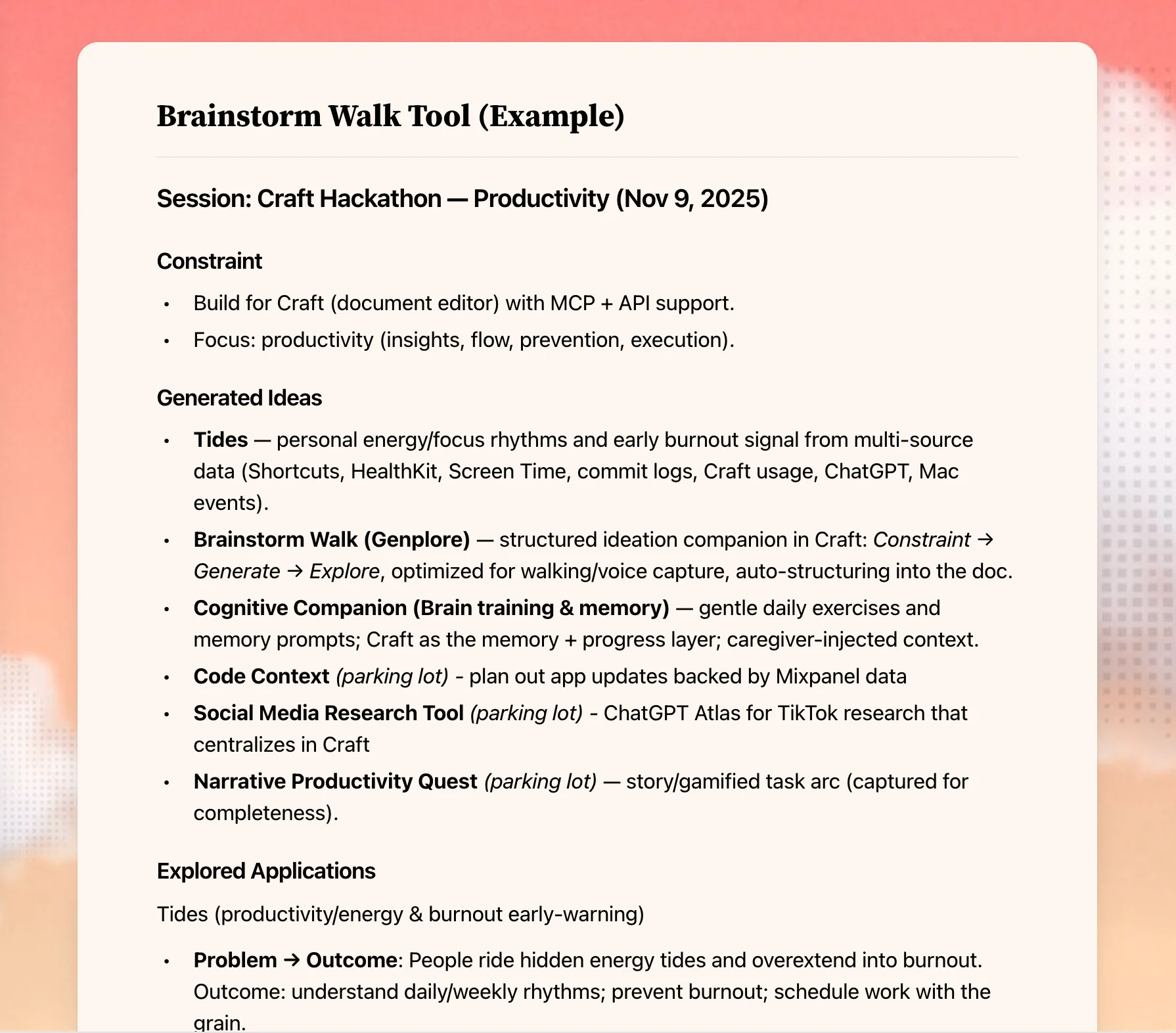
良いアイデアはデスクを離れたところで生まれ、そして忘れられます。このワークフローは散歩中にChatGPTの音声モードでブレインストーミングし、すべてを構造化されたCraftドキュメントに保存・整理します。アイデアが帰宅途中で消えることがありません。



Andreas InkがCraftとChatGPTを使って制作
自分で構築する
ステップ1 – CraftブレインストームドキュメントをAIアップする
ブレインストームのアイデアを整理するCraftドキュメントを作成します。次のBrainstorm Toolテンプレートをドキュメントにコピーします:
## Brainstorm Tool
### Instructions
**Context**
We are going for a brainstorming walk and using the Genplore brainstorming model. First we'll generate ideas given some constraint, then we'll explore how it can work practically. After the walk, I'll ask for you to save the ideas using the Brainstorm Tool.
**Example**
**Constraint**
AirPods Accelerometer / Gyroscope in an iOS app
**Generated Ideas**
- Beep in my ear when I have bad posture
- Measure workout reps / make sure I have good pushup technique
- Count drink intake from head movement
- Spatial Audio for people with visual impairments
**Explored Applications**
- PodPosture
- Beep in my ear when I have bad posture
- Detect change in forward acceleration
- Ability to change sensitivity
- People will want this because they have bad neck pain from working too much
*Below is where you'll enter ideas...*
### Constraint
*This can be a certain technology, problem, or experience / point of view I have.*
### Generated Ideas
*High level concepts you arrive at because of the constraint*
### Explored Applications
*Lower level how this would work, why people would use it etc*
ステップ2 – Craft MCPを有効化する
CraftのMCP(Model Context Protocol)接続をChatGPTまたはClaudeに設定します。コネクターの名前を「Brainstorm」にして、説明を「Used to save ideas from brainstorming.」に設定します。
ステップ3 – 散歩のためにAIをAIアップする
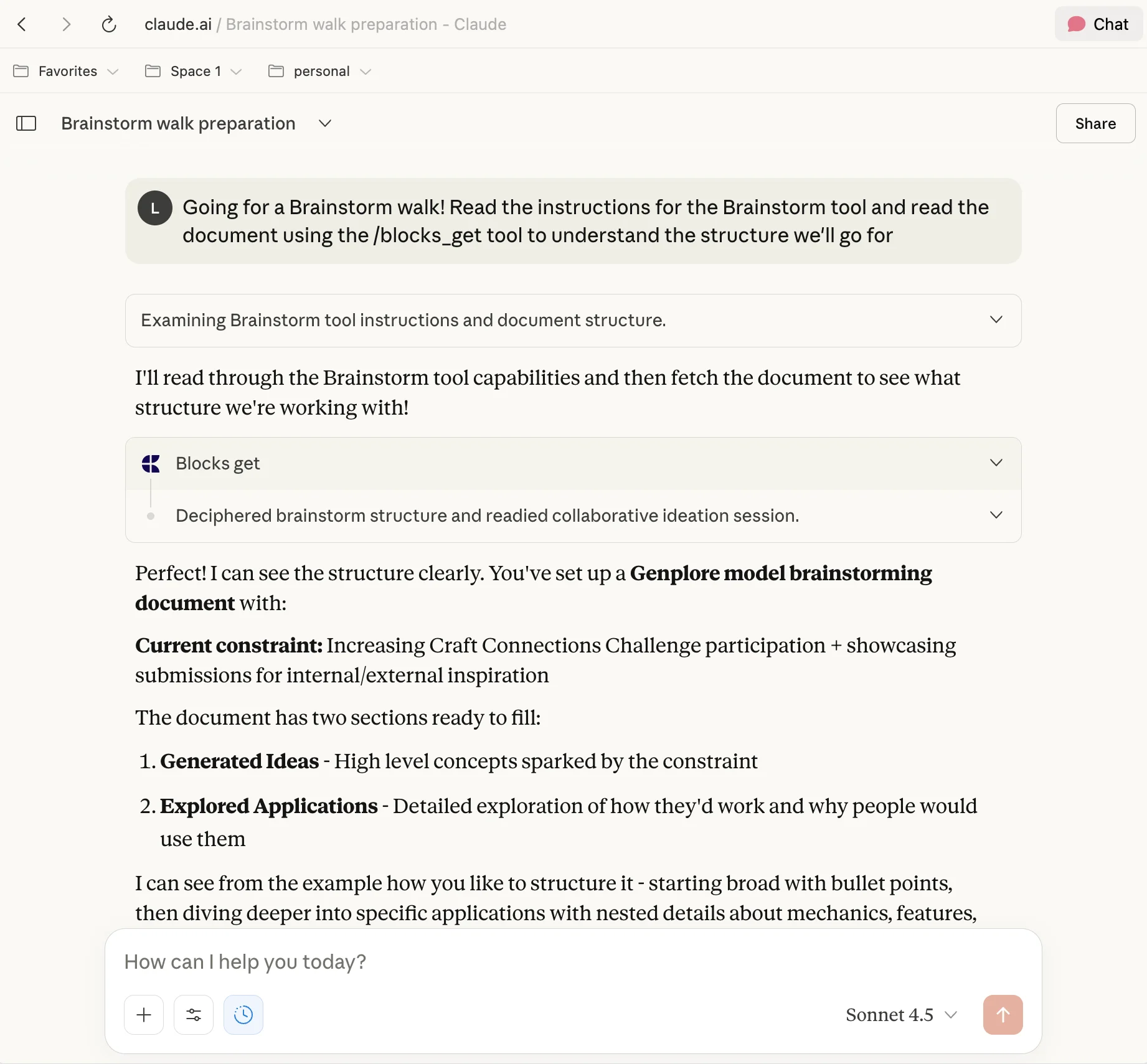
ChatGPTまたはClaudeのチャット(MCPが有効な状態)で次のプロンプトを入力します:
Going for a Brainstorm walk, read the instructions for the Brainstorm tool and read the document using the /blocks_get tool to understand the structure we'll go for
これによりAIはBrainstorm Toolテンプレートを読み取り、使用する構造を理解します。
ステップ4 – 制約を定義する
歩き始める前に制約を決めます。これには次のものが含まれます:
- 特定のテクノロジー(例:「AirPods加速度センサー」)
- 解決しようとしている問題
- あなたの経験や視点
制約はオープンエンドなブレインストーミングよりも良いアイデアを生み出します。
ステップ5 – 散歩を始めて話す
散歩に出かけて、同じチャットでChatGPTまたはClaudeの音声モードを開きます。声に出してブレインストーミングします:
- 思い浮かんだアイデアを共有する
- AIに明確化の質問をする
- 会話を通じてアイデアをさらに深く探求する
- 動きが思考の流れを助けるようにする
ステップ6 – ChatGPTにアイデアを整理させる
散歩が終わったら、AIにBrainstorm Toolを使ってアイデアを保存するよう促します。次のような質問をします:
Now save all the ideas we brainstormed to my Brainstorm Tool in Craft using the structure we discussed
AIはすべてを次のように整理します:
- Generated Ideas(散歩からの生のアイデア)
- Explored Applications(議論した実用的なアプリケーション)
ステップ7 – 確認とイテレーション
CraftでAIがキャプチャしたものを確認します:
- 自分のメモを追加する
- 関連するアイデアを組み合わせる
- フォローアップのためのアイデアにマークをつける
- 最も有望なコンセプトに取り組み始める
完成形
より多く、より良いアイデアが生まれ、整理されてすぐに実行できます。デスクに座ることなく。散歩が生産的な思考の時間になり、最高のアイデアが薄れる前にキャプチャされます。上のテンプレートをコピーして自分のブレインストーミングスタイルに合わせてアレンジしてください。