Craft update - A smarter Craft Assistant, easier imports, and more
This update brings a major upgrade to Craft Assistant, making it more capable than ever. It can now edit documents for you, create and organize content across your space, and even keep working in the background while you focus on something else.

Craft update - A smarter Craft Assistant, easier imports, and more
Hi there,
This update brings a major upgrade to Craft Assistant, making it more capable than ever. It can now edit documents for you, create and organize content across your space, and even keep working in the background while you focus on something else.
Alongside that, we’ve made it easier to bring your existing notes into Craft, improved Collections, and rolled out offline editing fully for Web and Windows.
Let’s take a look.
A smarter Craft Assistant
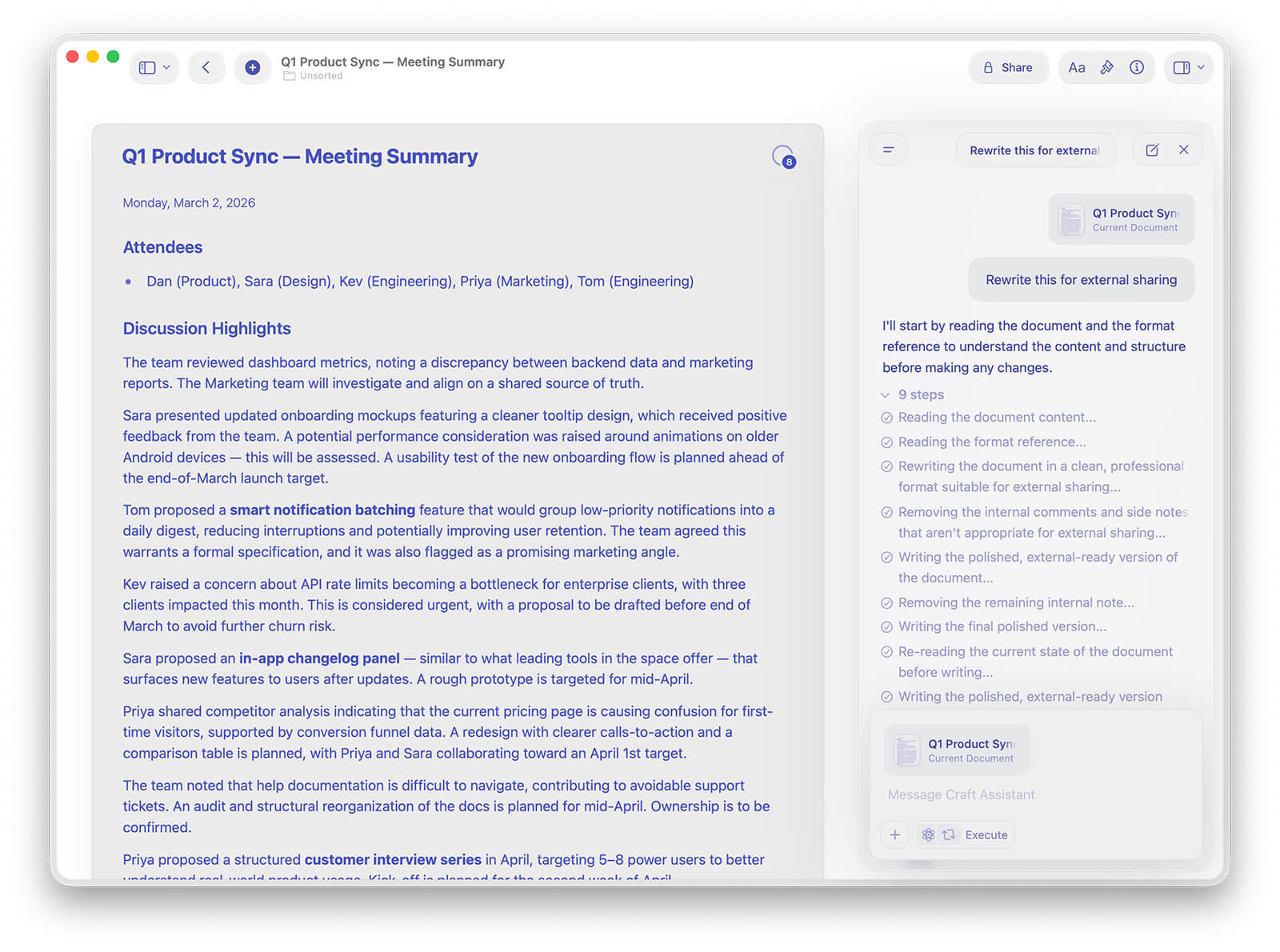
Craft Assistant just got a big upgrade. It can now edit your documents directly, helping you add, update, and rearrange content without leaving your conversation.
It can also create documents, organize folders, and structure your ideas across your space, making it feel more like a true collaborator.
Conversations are now displayed in clear back-and-forth turns, making longer chats easier to follow. And if you step away, the assistant can continue working in the background so your results are ready when you return.
We also polished the chat interface with clearer status indicators, improved input controls, and a cleaner overall layout.
Easier imports from other tools
Moving your content into Craft is now simpler and more reliable.
You can now import from:
- Evernote, with better support for large resources, encrypted notes, web clips, and file metadata
- Notion, including large and deeply nested workspaces
- Google Docs, using a new Google OAuth import flow
Notion and Evernote imports now open in a dedicated browser import page, giving you a smoother and more reliable experience when bringing large libraries into Craft.
Collections improvements
Collections continue to get better with several improvements to flexibility and usability.
You can now convert views in place, switching between Table and Gallery without losing your filters, sorting, or grouping.
Gallery views also look better than ever with new preview styles like Document, Fill, and Immersive. Plus, you can now choose to always show all enabled fields on cards without the “+n” indicator.
On iPhone, collections are now much easier to work with fullscreen, with smoother transitions, better landscape layouts, and improved selection behavior.
Widgets and everyday improvements
Widgets are now more helpful and more reliable.
The Today widget now shows overdue tasks alongside today’s tasks so nothing slips through the cracks. Widgets also refresh more frequently, keeping your tasks and recent documents up to date.
We’ve also refreshed the insert panel icons, improved presentation mode backgrounds, and made copy-paste from apps like Safari, Google Docs, Slack, and Word faster and more reliable.
Offline editing is now available on the Web & Windows as well
You can now edit your documents even when you’re offline on the Web and Windows.
Your changes will sync automatically once you’re back online, making Craft more reliable wherever you work.